

Description
Wireless Android Control via Web
Overview
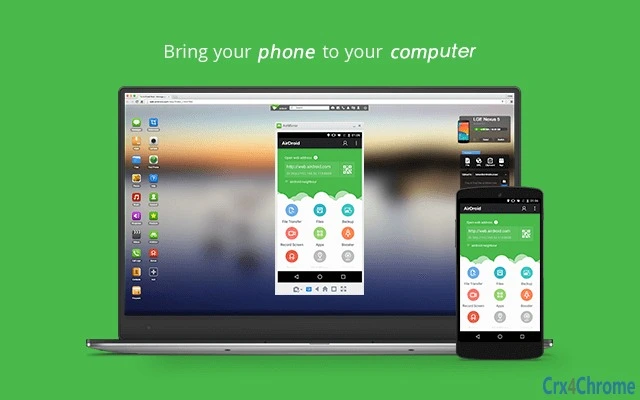
The AirMirror plugin enables wireless control of non-rooted Android devices through AirDroid Web, allowing users to interact with their mobile apps using a computer’s mouse and keyboard. Designed for seamless remote access, this tool bridges the gap between mobile and desktop environments, making it easier to manage tasks across devices without physical connection. The software is particularly useful for users who need to perform repetitive actions, manage files, or operate mobile apps from a larger screen. It supports both Windows and Mac platforms, ensuring broad accessibility for desktop users.
Targeted at individuals seeking efficient cross-device workflows, this plugin serves professionals, remote workers, and tech-savvy users who rely on multitasking across devices. It is part of the AirDroid ecosystem, which emphasizes secure, wireless connectivity for Android devices. The plugin functions as a bridge between the web interface and the Android device, enabling real-time interaction without requiring root access or complex setup. Real-world scenarios include managing social media, automating mobile tasks, or using mobile apps for presentations from a PC.
Key Features & Capabilities
- Wireless Device Control – Enables full mouse and keyboard interaction with Android devices through a web browser, ideal for remote operation without physical access.
- Non-Rooted Device Support – Functions on Android devices without requiring root privileges, expanding compatibility with standard user setups.
- Web-Based Integration – Works seamlessly with AirDroid Web (http://web.airdroid.com/), allowing access from any modern browser without additional software on the mobile side.
- Real-Time Interaction – Provides near-instant response to user inputs, ensuring smooth navigation and app usage across the Android interface.
- Lightweight Design – At only 2.5 MB, the plugin is optimized for quick installation and minimal system impact.
Users can leverage this tool for managing mobile apps, transferring files, or monitoring device activity from a desktop. For example, a content creator might use it to manage multiple social media accounts via a computer, while a remote worker could troubleshoot mobile apps during a virtual meeting. The plugin enhances productivity by extending the mobile interface to a larger screen with more precise input.
User Interface, Workflow & Performance
The plugin’s interface is minimal, designed to integrate directly into the browser environment when accessing AirDroid Web. It does not include a standalone desktop window, relying instead on the web-based workflow. Navigation is straightforward: users launch the web interface, connect their Android device, and begin controlling it immediately. The workflow prioritizes speed and simplicity, with no complex configuration required.
Performance is expected to be efficient given the lightweight footprint of 2.5 MB. However, exact resource usage details such as CPU or RAM consumption were not specified. General behavior suggests low overhead, suitable for background operation. Stability is maintained through the AirDroid platform’s established infrastructure, though real-world performance may vary based on network conditions and device capabilities. The plugin does not report any known issues related to crashes or freezes.
Compatibility & System Requirements
The AirMirror plugin is compatible with Windows and Mac operating systems, supporting the latest versions of both platforms as of the release date. It requires a modern web browser with JavaScript enabled and an active internet connection. The installation size is 2.5 MB, indicating a small footprint that fits most system configurations.
Exact system requirements were not listed. The developer did not provide additional hardware specifications, such as minimum RAM or processor speed. Compatibility with older OS versions is not confirmed. The plugin operates through a web-based interface, meaning it does not require native installation on the Android device, but the device must support the AirDroid service and allow wireless connection.
Pros and Cons
Pros
- Enables wireless control of Android devices without root access
- Lightweight at just 2.5 MB
- Works with any modern browser via AirDroid Web
- Supports real-time interaction with mobile apps
- Free to use with no hidden costs
Cons
- No standalone desktop interface; depends on web browser
- Exact system requirements not specified
- Performance may vary based on network stability
- Requires an active internet connection
- Limited to devices compatible with AirDroid service
FAQ Section
Is the AirMirror plugin free to use?
Yes, the plugin is available at no cost. It is part of the free AirDroid Web service, with no subscription or hidden fees required.
Can I use AirMirror without rooting my Android device?
Yes, the plugin is specifically designed to work with non-rooted Android devices, eliminating the need for advanced permissions or system modifications.
What operating systems does the plugin support?
The plugin is compatible with Windows and Mac systems, allowing users on both platforms to access and control their Android devices wirelessly.
Do I need to install software on my Android device?
No, the plugin operates through the web interface. The Android device only needs to be connected to the same network and have the AirDroid service enabled.
Is the connection secure?
Yes, the connection is secured through the AirDroid platform, which uses encrypted communication protocols to protect data during transmission.
Final Thoughts
The AirMirror plugin delivers a practical solution for users seeking to control their Android devices from a desktop environment without root access. Its lightweight design, compatibility with Windows and Mac, and seamless integration with AirDroid Web make it a valuable tool for productivity-focused individuals. While it relies on a stable internet connection and browser-based operation, its simplicity and lack of cost are significant advantages. For anyone managing mobile tasks from a PC, this tool offers a reliable and efficient workflow extension.
Download AirMirror Plugin for Web Control now.
Guides & Tutorials for AirDroid Remote Control Plugin App for Chrome
How to install AirDroid Remote Control Plugin App for Chrome
- Click the Preview / Download button above.
- Once redirected, accept the terms and click Install.
- Wait for the AirDroid Remote Control Plugin App for Chrome download to finish on your device.
How to use AirDroid Remote Control Plugin App for Chrome
This software is primarily used for its core features described above. Open the app after installation to explore its capabilities.
User Reviews for AirDroid Remote Control Plugin App for Chrome 0
No reviews found





